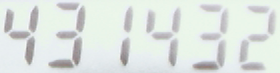
Use
ssocr -T to recognize the above image.
Use ssocr -T to recognize the above image.
Seven Segment Optical Character Recognition or ssocr for short is a program to recognize digits of a seven segment display. An image of one row of digits is used for input and the recognized number is written to the standard output. ssocr is available as C source code from this web page and runs on GNU/Linux (ssocr is also available as a package in some GNU/Linux distributions), FreeBSD (ssocr is also available as a port), Mac OS X (the required library Imlib2 can be installed via Homebrew), and even on Windows (using Cygwin, probably also via Windows Subsystem for Linux (WSL)). ssocr should work on any modern UNIX-like or POSIX compatible operating system (with all additional libraries installed, ssocr uses Imlib2 to access image data).
The ssocr binary needs to be built from the C programming language sources to use ssocr. Please tell me if you encounter problems.
Source code ssocr-2.25.1.tar.bz2 (licensed under the terms of the GNU GPL version 3 or later).
A mirror of the development Git repository for ssocr is available at GitHub.
(I do not provide ready to use binaries.)
On FreeBSD,
ssocr can be installed from the
Ports and Packages Collection
using
pkg:
pkg install ssocr
Please note that the I do not maintain the FreeBSD port. The port has been
created by
Emanuel Haupt.
On NixOS,
ssocr can be installed from the
package system.
Please note that the I do not maintain the NixOS package. The package has been
created by
Matthias Axel Kröll.
On Debian
Buster (10) and newer, ssocr can be installed from the
package system.
Please note that the I do not maintain the Debian package.
The package has been created by
Alex Myczko.
On Ubuntu
Disco Dingo (19.04) and newer, ssocr can be installed
from the
package system.
Please note that the I do not maintain the Ubuntu package.
The package has been created by
Alex Myczko.
On macOS (and x86-64 GNU/Linux), ssocr can be installed via
Homebrew
using brew install ssocr.
Please note that I do not maintain the Homebrew Formulae.
The algorithm used by ssocr is quite simple and completely deterministic. It is specialized for recognizing seven segment displays. It uses neither machine learning nor artificial intelligence. It can only recognize digits and characters created with seven segment displays, not other kinds of displays.
The image is optionally filtered and then transformed into a monochrome representation with the digits as foreground using some form of thresholding. This image is segmented to find the digits and then each digit is recognized individually.
By default, darker parts of the image comprise the foreground, light parts the background (i.e., black digits on a white canvas).
Starting at the left margin a column containing some foreground pixels is searched, marking the start of the first (potential) digit. After that a column containing only background pixels is searched to find the horizontal stretch of the (potential) digit. This process is repeated until no more (potential) digits are found.
The vertical segmentation works similarly, but gaps in (potential) digits are allowed, because in some digits the middle segment is unset.
Then too small potential digits are discarded, and it is checked if the number of remaining digits is inside the range given for the number of digits to expect.
The result is a sequence of in general differently sized rectangles containing one digit each.
This segmentation technique works for a single row of digits only.
Since the rectangles are aligned with the image given to ssocr, skewed digits can result in more than one digit inside one rectangle, thus breaking image segmentation and as a consequence digit recognition. Quite often a decimal point is located so close to a digit that a slight digit skew results in a segmentation error where the decimal point is contained in the same rectangle as a digit. Often this results in correct recognition of the digits, but the decimal point is ignored. Seven segment displays often use skewed images, thus this is a common problem.
Every digit found by the segmentation is classified as follows: A vertical scan is started in the center top pixel of the digit to find the three horizontal segments. Any foreground pixel in the upper third is counted as part of the top segment, those in the second third as part of the middle, and those in the last third as part of the bottom segment.
To examine the vertical segments, two horizontal scanlines starting on the left margin of the digit are used. The first starts a quarter of the digit height from the top, the other from a quarter of the digit height from the bottom. Foreground pixels in the left resp. right half represent left resp. right segments.
Since the above algorithm cannot recognize the digit one, a digit that has a width of less than one quarter of it's height is recognized as a one.
To recognize a minus sign a method similar to recognizing the digit one is used. If a digit is less high than 1/2 of its width, it is considered a minus sign.
To recognize a decimal point, e.g., of a digital scale, the size of each digit (that was not recognized as a one or minus sign already) is compared with the maximum digit width and height. If a digit is significantly smaller than that, i.e., both height and width very small relative to the maximum digit dimensions in the image, it is assumed to be a decimal point. If the widest digit in the image is a one, then the decimal point is quite likely not only half as wide as this widest digit. In this special case, only the height is compared to that of the other digits. All decimal points (or thousands separators) count towards the number of digits to recognize, despite not consisting of segments.
The recognized segments are then used to identify the displayed digit
using a table lookup (implemented as a switch statement).
Optionally, ssocr can print space characters between digits respectivly characters, based on minimum or average distance between them.
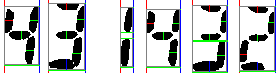
Image created with
ssocr -Dillustrate_algo.png -T six_digits.png.
In this image the left border of a digit is represented by a red column, the right border as a blue column. Horizontal green lines of digit width show connected vertical digit parts. The gray rectangles represent the digit dimensions.
Pixels found by the vertical scanline are shown in red, green and blue for the top, middle, and bottom third. Those found by the horizontal scanlines are shown in red and green for the left and right half of the digit. No scanlines are used to recognize a one, minus sign, or decimal point.
The ssocr program is intended for use with consistent input images. Thus a fixed setup, with a camera pointing at a number display based on seven segment digit displays, together with consistent lighting, provides the best recognition results. Such a consistent setup allows to find image preprocessing settings (e.g., ssocr options and commands) that compensate both systematic problems (e.g., non-uniform brightness) and variations in the input data. Variations in the input data are not only caused by random noise, but also by changes in the displayed number, that is, in the amount of light reflected (or emitted) due to changes in set and unset segments.
Looking at the debug image (named testbild.png
by default) that can be created with the option -D
(respectively --debug-image) can be helpful to find
the right settings to recognize an image. The -P
(respectively --debug-output) option can be used
to find out details, e.g., the size of the detected digits.
The -p (respectively --process-only)
option, together with the -o FILE (respectively
--output-image=FILE) option, can be used to
save the processed image to a file. This allows looking at the image
ssocr attempts to recognize without the additional lines
added to the debug image.
The first step when searching for settings that result in reliable recognition should be finding an acceptable thresholding value and possibly method. All set segments must be found in the foreground, and the background should not have too much noise.
Next, commands should be used to remove as much noise as possible.
Also, the crop command should be considered to
select only the relevant part of the image (with some border around the
seven segment displays, if possible). The remaining image foreground
should only comprise relevant seven segment displays.
If the digits are not aligned with the image borders, the
shear, rotate, or mirror
commands can be used to correct this.
If there is still too much noise in the image, options can be used to ignore small numbers of pixels during segmentation or recognition, or to ignore potential digits below a given size.
Specifying the number of digits contained in the image allows to detect some otherwise invisible recognition errors.
Specifying the character set used in the image allows to detect some recognition errors (i.e., plausible segment combinations that should not appear in the specific image), and sometimes to accept additional segment combinations for a given character.
Often, seven segment displays show skewed digits. A common
problem caused by this is a failure to recognize the digit 7, although
other digits are recognized correctly. If the displays are skewed,
i.e., the displays' vertical segments are not at a right angle with
the displays' horizontal segments, it may be necessary to use the
shear OFFSET command to adjust the image to
remove the skew, i.e., make the image show (almost) right angles
between horizontal and vertical segments.
If the image shows a dark background with light seven segment
displays in the foreground, e.g., when glowing segments are used,
either the option --foreground white (or the equivalent
--background black) or the command invert
is required.
When the threshold to distinguish foreground and background
pixels needs to be manually adjusted, ssocr's default
active automatic adjustment of the given threshold value to the image
is often problematic. Thus it is often helpful to disable this by
using the option --absolute-threshold in addition to the
--threshold=THRESH option.
The ssocr program is not optimized for execution speed. Most image manipulation algorithms are implemented in a simple way without any performance optimization. As a result it may be faster to use third party image manipulation software instead of the commands built into ssocr.
ssocr versions up to and including 2.24.1 are much slower when reading image data from standard input than when reading image data from a file.
Even when using the crop command, the threshold
value to separate image foreground from background is adjusted to the
luminance values of the whole image before cropping. Thus it is often
faster to either crop the image before giving it to ssocr,
or to use the --absolute-threshold option together
with a preadjusted threshold value. Alternatively, using the option
--adapt-after-crop skips threshold adjustment directly
before cropping.
The ssocr code includes a so called man page intended as reference documentation. You can also read an online version of the man page. Additionally, usage information follows below.
Seven Segment Optical Character Recognition Version 2.25.1
Copyright (C) 2004-2025 Erik Auerswald <auerswal@unix-ag.uni-kl.de>
This program comes with ABSOLUTELY NO WARRANTY.
This is free software, and you are welcome to redistribute it under the terms
of the GNU GPL (version 3 or later).

Usage: ssocr [OPTION]... [COMMAND]... IMAGE

Options: -h, --help               print this message
         -v, --verbose            talk about program execution
         -V, --version            print version information
         -t, --threshold=THRESH   use THRESH (in percent) to distinguish black
                                  from white
         -a, --absolute-threshold don't adjust threshold to image
         -T, --iter-threshold     use iterative thresholding method
         -n, --number-pixels=#    number of pixels needed to recognize a segment
         -N, --min-segment=SIZE   minimum width and height of a segment
         -i, --ignore-pixels=#    number of pixels ignored when searching digit
                                  boundaries
         -M, --min-char-dims=WxH  minimum width and height of a character/digit
         -d, --number-digits=RNG  number of digits in image (-1 for auto,
                                  positive number, or positive range)
         -r, --one-ratio=#        height/width ratio to recognize a 'one'
         -m, --minus-ratio=#      width/height ratio to recognize a minus sign
         -H, --dec-h-ratio=#      max_dig_h/h ratio to recognize decimal point
         -W, --dec-w-ratio=#      max_dig_w/w ratio to recognize decimal point
         -o, --output-image=FILE  write processed image to FILE
         -O, --output-format=FMT  use output format FMT (Imlib2 formats)
         -p, --process-only       do image processing only, no OCR
         -D, --debug-image[=FILE] write a debug image to FILE or testbild.png
         -P, --debug-output       print debug information
         -f, --foreground=COLOR   set foreground color (black or white)
         -b, --background=COLOR   set background color (black or white)
         -I, --print-info         print image dimensions and used lum values
         -g, --adjust-gray        use T1 and T2 from gray_stretch as
                                  percentages of used values
         -l, --luminance=KEYWORD  compute luminance using formula KEYWORD
                                  use -l help for list of KEYWORDS
         -s, --print-spaces       print spaces between more distant digits
         -A, --space-factor=FAC   relative distance to add spaces
         -G, --space-average      use average instead of minimum distance
                                  to determine spaces between digits
         -S, --ascii-art-segments print recognized segments a ASCII art
         -X, --print-as-hex       change output format to hexadecimal
         -C, --omit-decimal-point omit decimal points from output
         -c, --charset=KEYWORD    select recognized characters
                                  use -c help for list of KEYWORDS
         -F, --adapt-after-crop   do not adapt threshold to image directly
                                  before, only after, cropping

Commands: dilation [N]            [N times] dilation algorithm
                                  (set_pixels_filter with mask of 1 pixel)
          erosion [N]             [N times] erosion algorithm
                                  (set_pixels_filter with mask of 9 pixels)
          closing [N]             closing algorithm
                                  ([N times] dilation then [N times] erosion)
          opening [N]             opening algorithm
                                  ([N times] erosion then [N times] dilation)
          remove_isolated         remove isolated pixels
          make_mono               make image monochrome
          grayscale               transform image to grayscale
          invert                  make inverted monochrome image
          gray_stretch T1 T2      stretch luminance values from [T1,T2] to
                                  [0,255] (use --adjust-gray for percentages)
          dynamic_threshold W H   make image monochrome w. dynamic thresholding
                                  with a window of width W and height H
          rgb_threshold           make image monochrome by setting every pixel
                                  with any values of red, green or blue below
                                  the threshold to black
          r_threshold             make image monochrome using only red channel
          g_threshold             make image monochrome using only green channel
          b_threshold             make image monochrome using only blue channel
          white_border [WIDTH]    make border of WIDTH (or 1) in background
                                  color
          shear OFFSET            shear image OFFSET pixels (at bottom) to the
                                  right
          rotate THETA            rotate image clockwise by THETA degrees
          mirror {horiz|vert}     mirror image horizontally or vertically
          crop X Y W H            crop image with upper left corner (X,Y) with
                                  width W and height H
          set_pixels_filter MASK  set pixels that have at least MASK neighbor
                                  pixels set (including checked position)
          keep_pixels_filter MASK keeps pixels that have at least MASK neighbor
                                  pixels set (not counting the checked pixel)

Defaults: needed pixels                         =  1
          minimum segment size                  =  1
          minimum character width               =  1
          minimum character height              =  1
          ignored pixels                        =  0
          minimum number of digits              =  6
          maximum number of digits              =  6
          threshold                             = 50.00
          foreground                            = black
          background                            = white
          luminance                             = Rec709
          height/width threshold for digit one  =  3
          width/height threshold for minus sign =  2
          max_dig_h/h threshold for decimal sep =  5
          max_dig_w/w threshold for decimal sep =  2
          space width factor                    = 1.40
          character set                         = full

Operation: The IMAGE is read, the COMMANDs are processed in the sequence
           they are given, in the resulting image the given number of digits
           are searched and recognized, after which the recognized number is
           written to STDOUT.
           The recognition algorithm works with set or unset pixels and uses
           the given THRESHOLD to decide if a pixel is set or not.
           Use - for IMAGE to read the image from STDIN.

Exit Codes:  0 if correct number of digits have been recognized
             1 if a different number of digits have been found
             2 if one of the digits could not be recognized
             3 if successful image processing only
            42 if -h, -V, -l help, or -c help
            99 otherwise
Imlib2 (and therefore ssocr) does not work well with Netpbm images.
Since version 2.8.1 ssocr has a manual page. You can read read it online as well.
Some issues on GitHub also contain information regarding the use of ssocr, primarily in the form of examples where recognition did not work initially. Often, using the right options and commands is all it needs to recognize the seven segment displays in an image, but finding those is not always easy.
I develop ssocr on GNU/Linux, without testing on other platforms. I do not have or use non-free operating systems like Windows or macOS, thus I cannot even test compilation on those platforms. Nevertheless, I have been contacted by users of those platforms and helped them solve problems compiling or using ssocr. The following list is intended to provide starting points regarding common problems caused by using a proprietary platform.
ssocr to
ssocr.exe to use it on Windows.
make CPPFLAGS=-I/opt/X11/include or
make CPPFLAGS=-I/Library/Developer/CommandLineTools/SDKs/MacOSX11.3.sdk/System/Library/Frameworks/Tk.framework/Versions/8.5/Headers/.
(See
GitHub issue 3.)
This program was developed as a proof of concept to test the recognition algorithm (this still shows in the source code...) with the intention to recognize the number shown on an RSA SecurID 600 token. This use case is the reason for some default settings, e.g., darker digits on lighter background and expecting 6 digits in the image.
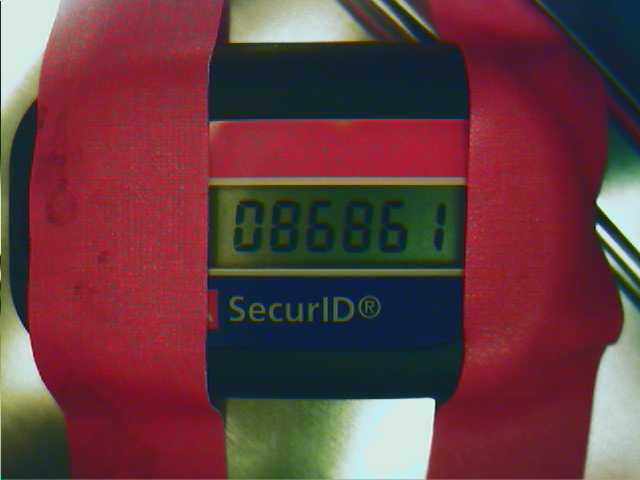
Use ssocr crop 230 195 220 60 -t 20 to get the token from the
image above.
Once upon a time a fellow member of the UNIX-AG, together with two of his colleagues, got issued a single RSA SecurID 600 token that they needed to share. To avoid the situation that the one needing the token is not the one currently carrying it, he looked for a more practical alternative.
The available general OCR software was not able to recognize a digit created with a seven segment display, mainly because the segments are not connected. The gaps between segments of each individual seven segment display often resulted in segmentation errors, i.e., the general purpose OCR software would segment a single digit into more than one character, but then the digit could not be recognized.
This gap was filled by ssocr.
For quite some time, a usb camera pointed to the token inside a cookie box and ssocr was used to get the number into the computer. A script using this info and a password was then used for login.
This setup means that the user has no need to carry the token with him and it can even be easily shared with co-workers. The complicated login procedure requiring a password and in this case two token numbers (which means a one minute wait for the next number) was incentive enough to replace the two factor authentication by traditional authentication measures. The security of the system is determined by the weakest link, which was not the one-time passcode provided by the token in this specific case.
The first versions of ssocr did not contain the image manipulation algorithms. A seperate program called ssocrpp (seven segment OCR preprocessor) was used instead. Since this program used Imlib2 as well, an intermediate image file had to be used. To overcome this, versions 2.x.x of ssocr include all functionality of ssocrpp.
The second major version of ssocr integrated all functionality
in one binary. This was the first publicly released ssocr
version. Development concentrated on adding image manipulation
functions. No external image manipulation programs were needed
any more, thus easing use of ssocr on differing
GNU/Linux
distributions.
Since version 2.9.0 the image can be read from a pipe, easing the use of
external image manipulation programs.
Since version 2.11.0 a decimal point can be detected.
Since version 2.12.0 hexadecimal digits can be detected.
Since version 2.13.0 the number of digits can be determined automatically.
Recognition of a decimal point and an arbitrary number of digits has been
added to read the display of digital scales.
Version 2.14.0 introduces an alternative version of the digit 9,
where the lower horizontal segment is not set.
Version 2.15.0 adds detection of minus signs, thanks to a patch by
Cristiano Fontana.
Version 2.16.0 adds a command to mirror the image horizontally or
vertically.
Version 2.17.0 adds an option to print just the ASCII art part of the
debug output, adds an option to change the output to a hex string
representing set segments, and adds seven characters shown on a
display used in a Chinese table tennis robot.
Version 2.18.0 adds a convenience parameter N to the dilation and
erosion command.
Version 2.19.0 adds options to select the set of recognized characters,
and to omit decimal points from the output.
Version 2.20.0 adds options to adjust the ratios used for decimal
separator recognition.
Version 2.21.0 adds an option to print spaces between digits that are
positioned further away, e.g., to indicate some grouping.
Version 2.22.0 adds a NEWS file, fixes compilation with GCC 10, adds the
two characters 'j' and 'y' to the (default) full charset,
and adds a new charset tt_robot to ease working with some
table tennis robot's seven segment displays.
Version 2.22.1 fixes a build error with Imlib2 version 1.7.5 (the Imlib2
specific imlib2-config has been replaced by the generic
pkg-config).
Version 2.22.2 provides documentation improvements only.
Version 2.23.0 adds options to specify the minimum segment
size, the minimum character size, and to give a range for
the number of digits that should be found in the image.
Version 2.23.1 changes how the date in the man page is determined (to
help reproducible builds) and adds some small documentation improvements.
Version 2.24.0 fixes decimal point recognition when the widest digit
is a one, adds recognition of lower case versions of the characters
h and r, and improves the documentation as well
as error, warning, and debug messages.
Version 2.24.1 prints warnings for unknown charset and luminance
formula names. It also fixes printing of a debug message to
really require the option to print debug output. It also includes
documentation improvements.
Version 2.25.0 adds an option to potentially avoid adjusting the
threshold to the uncropped image. It also prints a new warning when
the incompatible options -a, --absolute-threshold and
-T, --iter-treshold are combined. It also improves
performance when reading image data from standard input, when using
gray_stretch together with -g, --adjust-gray,
and when using -p, --process-only together with only the
grayscale and/or mirror commands. It also
includes documentation improvements.
Version 2.25.1 fixes printing of a debug message to really require
the option to print debug output.
Through the years I have collected links to similar projects, use of ssocr, and related information. Some of them are no longer available on the web. Sometimes the Wayback Machine can help, but often the pages are not archived there and long forgotten.
A similar Project in Perl, published by the German Linux Magazin, is no longer available.
LimID, no longer available, was another project using specialized OCR to read a seven segment display. This included some hardware to push a button on the token.
Display OCR, based on OpenCV-Python and python-tesseract.
Another seven-segment OCR solution is sevenSegDecode. It uses a very simple algorithm that requires precise camera positioning. My more complex algorithm tries to solve the positioning problem in the segmentation step, which attempts to locate the individual seven segment displays. This is similar to the now forgotten Linux Magazin project above. A fellow Unix-AG member had the same idea, but it did not work reliably, which motivated me into writing ssocr using a more robust algorithm.
Using ssocr to take temperature readings for fermentation temperature control.
Alex Samorukov blogged about using ssocr for the original use case of reading the number shown by an RSA SecurID token. :-)
ssocr was used in a 7-segment data logger Perl script written and used by Alan Bates.
DIY Data Capture via Web Cam (link goes to Wayback Machine) by Paul Wallich mentioned ssocr, but it could not cope with the lighting conditions he encountered. :-(
My simple image grabber for linux.
A comparison of formulas to create grayscale images.
ssocr uses Imlib2 for image I/O.
The FobCAM showed the RSA SecurID token of someone. This is page is currently (2009-07-17) offline, but you can try the Wayback Machine.
Image processing can be done with Netpbm, ImageMagick, or GraphicsMagick, among others (consider GIMP or ImageJ for interactive use).
The leptonlib, found at
Leptonica,
is a C library for image processing and analysis.
The web site contains some good reading besides library documentation as well.
The GD Graphics Library
is a comprehensive graphics library.
GEGL is a newcomer from the GIMP community.
GFXprim is a recent 2D bitmap graphics
library with C and Python APIs.
Anyway, I'd like a simple wrapper around the different librarys for working
with image formats, to easily load an image into memory and access the
individual pixels (and nothing else), but have not found this yet.
There are too many C++ libraries for image processing and computer vision. Some of them are: ccv, FreeImage, GIL (part of Boost), Insight Segmentation and Registration Toolkit (ITK), LTI-Lib, OpenCV, OpenImageIO, ORFEO Tool Box, VIPS, VXL.
A few free OCR programs are GNU Ocrad, GOCR, OCRFeeder, ocropus, Tesseract OCR.
unpaper is an interesting program to process scanned paper sheets.
back to my homepage.