KBibTeX for KDE 3 is no longer under development.
Please use KBibTeX for KDE 4.
Users of Kile for KDE4, see below, please.
Embedding into Kile for KDE3
As KBibTeX is programmed as a KDE Part, you can embed it into virtually any KDE application. This pages describes how to embed KBibTeX into Kile. However, this procedure is only required for Kile prior to version 1.9. Starting from Kile 1.9, KBibTeX support (but not KBibTeX itself) should be integrated by default.
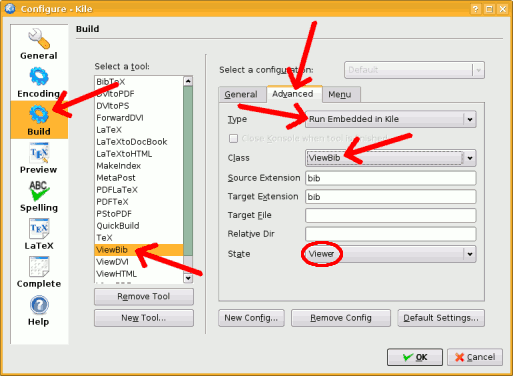
First, goto Kile's settings menu and configure Kile. Select the “Build” section. In the list to select a tool, choose “ViewBib”. On the right, open the “Advanced” tab and set the type to “Run Embedded in Kile” and the class to “ViewBib”. State should be set to “Viewer” and not “Editor” as in earlier version of this tutorial.
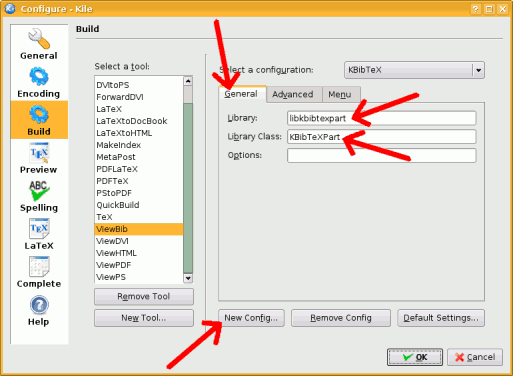
Next, switch to the “General” tab and set the library to “libkbibtexpart” and the library class to “KBibTeXPart”. Optionally, you may save your configuration. Save the settings by pressing “Ok”.
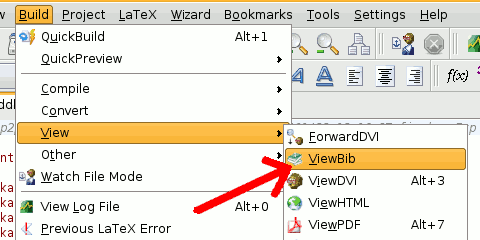
If you have opened a LaTeX file with \bibliography{...} commands or added bibliography files to your Kile project, select from the “Build” menu “View” and then “ViewBib”. You will see a small window listing all available BibTeX files.
KBibTeX and Kile for KDE4
KBibTeX, as an KDE3 application, can no longer be used as a part with Kile for KDE4. However, you can still use KBibTeX as a stand-alone application in conjunction with Kile.
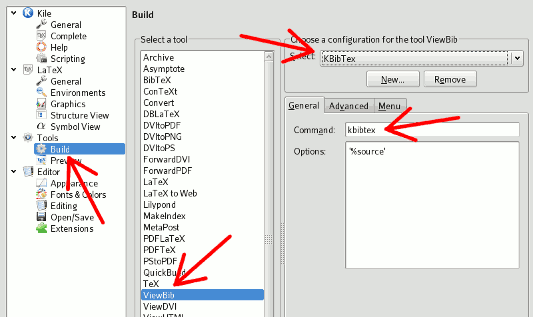
The settings dialog in Kile for KDE4 is similarly structured as in Kile for KDE3. Using KBibTeX within KDE4 requires changes in two places.
First, choose to run KBibTeX “outside of Kile”:
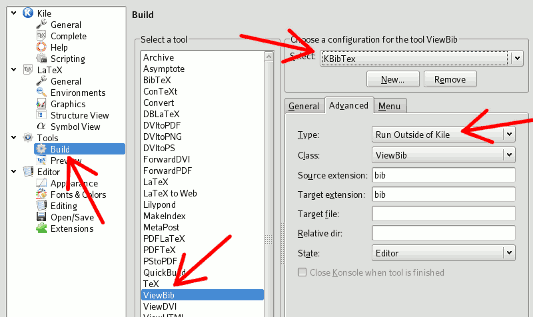
Second, select which program to run. In the following example, only “kbibtex” is written, but if the program is not in your PATH, you may have to explicitly state where the binary list located, e. g. “/opt/kde3/bin/kbibtex”:


Last Updated: 17-Jun-2013 Contact: Thomas Fischer RSS feed